Homelab
I’ve really missed having a homelab over the past few years. I vaguely remember a PC I assembled in the early 2000s with a dual Pentium II, ECC RAM, and Debian GNU/Linux. It served as a firewall, DNS, DHCP server, mail server (back when spam wasn’t yet a massive problem), and file server.
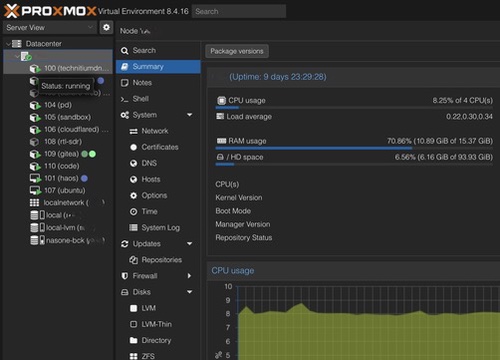
Proxmox VE Dashboard
For a long time, I got by with a minimal home setup—just a MacBook and a router. But eventually, you realize you need more: a NAS for proper data control (the cloud isn’t a universal solution), a UPS to keep your storage safe from power fluctuations, and an ever-growing collection of IoT devices.
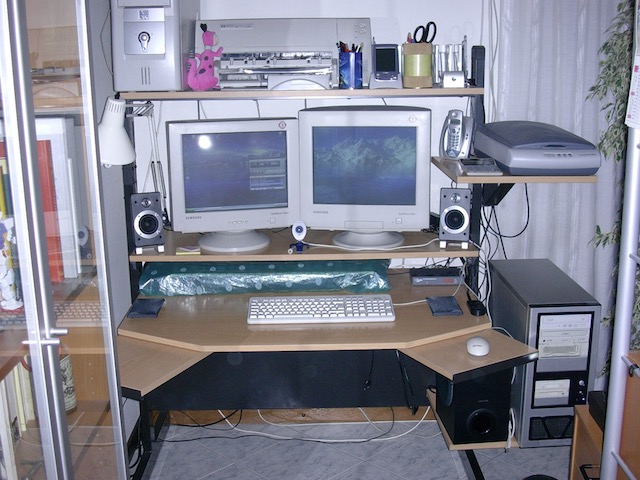
Server+Workstation setup - Circa 2000 AD
Why a Homelab Matters
I’ve always enjoyed having control over my own infrastructure and being able to experiment. There’s something satisfying about managing your own network and services rather than relying entirely on external providers.
The Journey So Far
Proxmox has really reignited my interest in building this out. Over the years, I’d experimented with Raspberry Pi projects as a testbed for ideas, but they always felt a bit limiting. A few years back, I set up a Docker Swarm cluster with a Raspberry Pi 2—a fun project but probably overkill for what I needed.
Proxmox has been a game changer for me. In the past, I tried installing VMware ESXi, but Proxmox’s simplicity and open-source nature convinced me to give it a shot.
A year ago, I picked up an N100 mini PC. It’s limited in specs and modest in cost, but it’s proving to be a solid foundation for a proper homelab setup.
Current Setup
My current homelab has an extreme cabinet setup. It’s nearly invisible despite being in plain sight in my living room. The challenge is that being in a cramped space, I had to cool everything with two 120mm fans that make some noise. But for now, it works well.
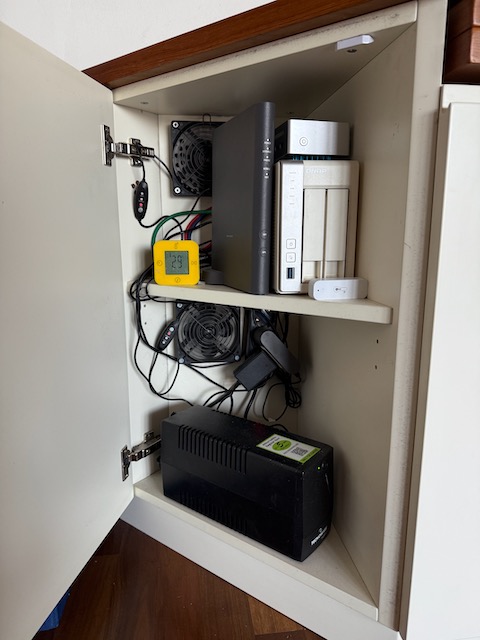
Homelab setup - 2025
Bare Metal
- Vodafone Fiber Router: Handles my internet connection and basic routing.
- N100 Mini PC: The heart of my homelab, running Proxmox VE for virtualization.
- NAS: A 2-bay QNAP with 4TB drives in RAID 1 mirroring.
- UPS: Protects my setup from power issues.
- WiFi AP: A PoE 1Gb Tenda ceiling access point providing WiFi coverage throughout the house.
Virtual Machines (Proxmox)
- Home Assistant: Still getting familiar with it, but it’s invaluable for home automation tasks.
- Ubuntu Desktop: A remote desktop machine for general computing tasks.
LXC Containers (Proxmox)
- DNS/DHCP Server (Technitium): DNS and DHCP server for my network. Also handles ad-blocking and local DNS resolution.
- WireGuard VPN: My personal VPN for secure access from anywhere. Configured on-demand for iOS devices.
- Cloudflared: Tunneling solution that eliminates the need to expose ports while securely accessing services remotely.
- Code Server: VS Code in the browser for a roaming development environment.
- Gitea: Self-hosted Git service. After struggling with GitLab, Gitea proved much lighter and perfectly suited for small teams. I’m migrating my private projects here. Gitlab is great, but overkill for my needs.
- RTL-SDR Server: TCP-based RTL-SDR server. More convenient than managing USB dongles on my laptop. Still experimenting with it.
- iCloud Photo Downloader: Keeps a complete local backup of my Apple Cloud photos. Essential since no single device can hold my entire library.
- Debian Sandbox: General-purpose utility container for experiments and ad-hoc tasks.
Other Experiments
- I attempted to set up a game streaming server (Parsec and Steam) but the machine is too limited for that, even with the challenges of GPU passthrough.
- Unfortunately, after a few months, the internal SSD started having issues, likely due to high temperatures and poor quality. Fortunately, I had time to make a complete backup because Proxmox started sending me concerning SMART reports.
Future Plans
I’m considering expanding my setup with a more powerful server in the future, possibly with better cooling solutions for the cabinet.
Overall, having a homelab has been a rewarding experience. It allows me to learn, experiment, and maintain control over my digital life. If you’re considering setting up your own homelab, I highly recommend it!